Welcome to Chatbot Essentials
This page contains essential exercises and guides for building effective chatbots using thalabus.
Interactive Chatbot GUI
To help webinar attendants experiment with large language models, we have created a simplified chatbot graphical user interface (GUI). This interactive tool allows you to explore and understand how chatbots work with different language models in a hands-on environment.
Access the chatbot GUI here: https://training.thalabus.ai
Configuration Instructions
When you open the chatbot GUI, you will need to configure the following settings:

- Endpoint: Set this to
https://demo.thalabus.ai/v1 - User ID: Enter
training - Session: Choose a session name in the format
training-xxx, wherexxxis your name (e.g.,training-alice) - Token: Request a valid authentication token from your trainer and enter it in this field
Once configured, click the "Connect" button to establish a connection and begin your exercises. Creation of a new session may take up to a minute.
Exercise Modules
The right panel of the GUI contains configuration areas for different aspects of large language model interaction. You will work through the following exercise modules, each focusing on a specific component:
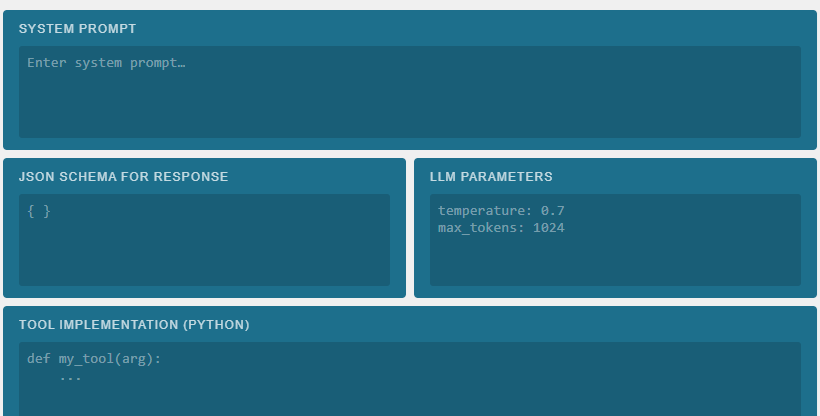
- Prompt Engineering: Explore how system prompts shape model behavior. You will experiment with different system prompts in the dedicated panel and observe how they influence the chatbot's responses and personality.
- Tool Calling: Learn about function calling and tool integration. In this module, you will implement and experiment with Python language tools, understanding how models can leverage external functions to extend their capabilities.
- Data Extraction & Metadata: Master structured data extraction using JSON schemas. You will define and refine JSON schemas to extract and format complex data and metadata from model outputs.
- LLM Parameters: Understand the impact of model parameters on generation quality and behavior. You will adjust temperature and token limits to control output randomness and length, observing how these parameters affect model performance.
Each module builds on your understanding of how modern language models work, preparing you to build more sophisticated chatbots and AI applications.
Behind the Scenes
The training GUI itself is a technological demonstration. It was built entirely using the vibe coding methodology — a modern, AI-assisted development approach where the application logic is described in natural language and iteratively shaped into working code — implemented in Python.
Under the hood, the GUI uses the thalabus Python SDK (SDK stands for Software Development Kit, a library of tools and interfaces that simplifies interaction with a platform's APIs). The SDK can be installed on any computer with a single command:
pip install thalabus
Through the SDK, the GUI communicates with the demo.thalabus.ai AI platform server via thalabus REST APIs (REST — Representational State Transfer — is the standard protocol used by modern web services to exchange data over HTTP). This means the same capabilities you are using in the exercises are directly accessible from any Python script or application using the same SDK.
The training GUI therefore serves a dual purpose: it is both a hands-on learning environment for chatbot essentials and a live demonstration of what can be built with the thalabus SDK and REST API.
Quick Start Example with thalabus Python SDK
Here's a simplified example of how the training GUI implements the core functionality using the thalabus Python SDK:
from thalabus import Client

# Connect to the thalabus API (equivalent to clicking Connect button)
client = Client(
    endpoint="https://demo.thalabus.ai/v1",
    user_id="training",
    session="training-alice",
    token="your_token_here"
)

# Create a session
session = client.create_session()

# First interaction: Send a prompt and receive an answer
response = session.chat(
    message="What is the difference between machine learning and deep learning?",
    system_prompt="You are a helpful AI assistant.",
    temperature=0.7,
    max_tokens=1024
)

print(response.message)  # Output: The model's response

# Second interaction: Continue the conversation in the same session
follow_up = session.chat(
    message="Can you give me a practical example of deep learning?"
)

print(follow_up.message)  # Output: Follow-up response from the model
This simple Python script demonstrates the same operations performed by the training GUI when you interact with the chatbot. You can use the same code in any Python environment after installing the thalabus SDK.